一个Linux下的adb 安卓截屏脚本
一个Linux下的adb 安卓截屏脚本
最近在真机调试安卓,由于每次截图保存到电脑都要adb shell、adb pull,并且由于用的同一个命名导致后面的截图会把前面的覆盖掉,非常麻烦,因此写了一个Linux下的通用脚本,明显提高了效率。
由于某些软件不支持文件名带冒号“:“,所以加了参数判断来生成不同格式的文件名。记录一下。
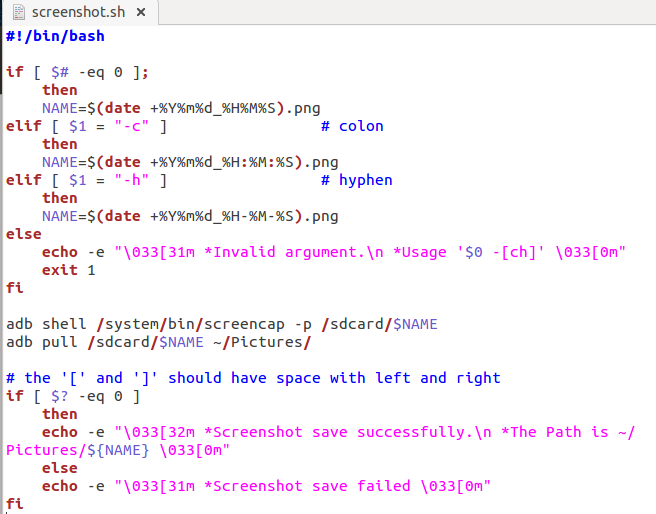
#!/bin/bash
if [ $# -eq 0 ] then
    NAME=$(date +%Y%m%d_%H%M%S).png
elif [ $1 = "-c" ]  then              # colon
    NAME=$(date +%Y%m%d_%H:%M:%S).png
elif [ $1 = "-h" ] then                 # hyphen
    NAME=$(date +%Y%m%d_%H-%M-%S).png
else
    echo -e "\033[31m *Invalid argument.\n *Usage '$0 -[ch]' \033[0m"
 exit 1
fi

adb shell /system/bin/screencap -p /sdcard/$NAME
adb pull /sdcard/$NAME ~/Pictures/

# the '[' and ']' should have space with left and right
if [ $? -eq 0 ] then
    echo -e "\033[32m *Screenshot save successfully.\n *The Path is ~/Pictures/${NAME} \033[0m"
else
    echo -e "\033[31m *Screenshot save failed \033[0m"
fi
高亮不太好,截个图吧:
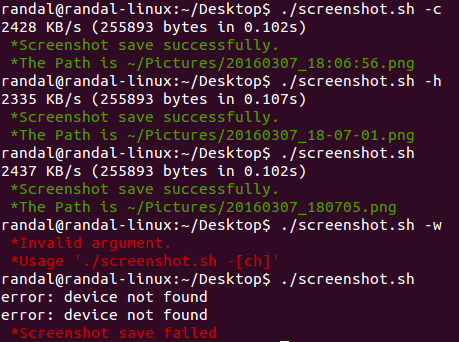
直接运行./screenshot.sh进行截屏,截屏失败提示红色,成功提示绿色:可选参数-c 使用冒号格式,-h 使用短横线格式