java 实现WebService调用入门
webservice:
就是应用程序之间跨语言的调用
1. xml
2. wsdl: webservice description language web服务描述语言,通过xml格式说明调用的地址方法如何调用,可以看错webservice的说明书.
3. soap simple object access protoacl (简单对象访问协议) ,限定了xml的格式,soap 在http(因为有请求体,所以必须是post请求)的基础上传输xml数据.请求和响应的xml 的格式如:
<Envelop>
<body>
//....
</body>
</Envelop>
operation name:服务提供的方法
静态方法不能发布为外部服务
- 运用jkd自带的代码生成访问服务器的客户端代码 E:/wsimort -s . http://test.cm/?wsdl
- 我们可以把webservice看做是web服务器上的一个应用,web服务器是webservice的一个容器
- 函数的参数在 http://test.cm/?xsd=1
- JAX-WS是指 java api for xml -WebService
- 测试 WebService服务的 explorer
- Web Service Explorer 可以显示返回的xml格式
- targetNamespace 默认为倒置的包名
客户端调用WebService的方式:
- 通过wximport生成代码
- 通过客户端编程方式
- 通过ajax调用方式
- 通过 URL Connection 方式调用
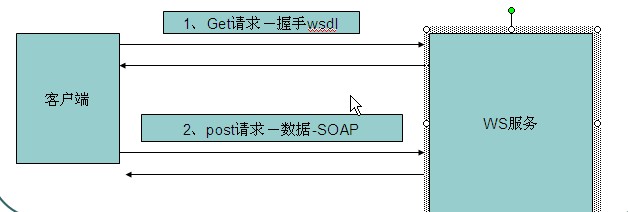
请求过程分析:
- 使用get方式获取wsdl文件,称为握手
- 使用post发出请求
- 服务器响应成功过
几种监听工具:
- http watch
- Web Service explorer
- eclipse 自带工具 TCP/IP Monitor
服务端代码
package com.webservcie;
import javax.jws.WebMethod;
import javax.jws.WebParam;
import javax.jws.WebResult;
import javax.jws.WebService;
import javax.xml.ws.Endpoint;

/**
 * WebService
 * 将 Java 类标记为实现 Web Service,或者将 Java 接口标记为定义 Web Service 接口
 */
@WebService(serviceName="MyService",targetNamespace="http://www.baidu.com")
public class HelloService {
    @WebMethod(operationName="AliassayHello")
    @WebResult(name="myReturn")
    public String sayHello(@WebParam(name="name") String name){
        return  "hello: " + name;
    }

    public String sayGoodbye(String name){
        return  "goodbye: " + name;
    }

    @WebMethod(exclude=true)//当前方法不被发布出去
    public String sayHello2(String name){
        return "hello " + name;
    }

    public static void main(String[] args) {
        /**
         * 参数1:服务的发布地址
         * 参数2:服务的实现者
         *  Endpoint  会重新启动一个线程
         */
        Endpoint.publish("http://test.cm/", new HelloService());
        System.out.println("Server ready...");
    }
}
1. 客户端调用(wximport自动生成代码 【推荐】)
package com.wsclient;
public class App {
    /**
     * 通过wsimport 解析wsdl生成客户端代码调用WebService服务
     *
     * @param args
     *
     */
    public static void main(String[] args) {
        // TODO Auto-generated method stub
        /**
         * <service name="MyService">
         * 获得服务名称
         */
        MyService mywebService = new MyService();
        /**
         * <port name="HelloServicePort" binding="tns:HelloServicePortBinding">
         */
        HelloService hs = mywebService.getHelloServicePort();
        /**
         * 调用方法
         */
        System.out.println(hs.sayGoodbye("sjk"));
        System.out.println(hs.aliassayHello("sjk"));
    }
}
# 2. 通过ajax+js+xml调用
<html>
    <head>
        <title>通过ajax调用WebService服务</title>
        <script>
            var xhr = new ActiveXObject("Microsoft.XMLHTTP");
            function sendMsg(){
                var name = document.getElementById('name').value;
                //服务的地址
                var wsUrl = 'http://192.168.1.100:6789/hello';
                //请求体
                var soap = '<soapenv:Envelope xmlns:soapenv="http://schemas.xmlsoap.org/soap/envelope/" xmlns:q0="http://ws.itcast.cn/" xmlns:xsd="http://www.w3.org/2001/XMLSchema" xmlns:xsi="http://www.w3.org/2001/XMLSchema-instance">' +
                    ' <soapenv:Body> <q0:sayHello><arg0>'+name+'</arg0>  </q0:sayHello> </soapenv:Body> </soapenv:Envelope>';
                //打开连接
                xhr.open('POST',wsUrl,true);
                //重新设置请求头
                xhr.setRequestHeader("Content-Type","text/xml;charset=UTF-8");
                //设置回调函数
                xhr.onreadystatechange = _back;
                //发送请求
                xhr.send(soap);
            }
            function _back(){
                if(xhr.readyState == 4){
                    if(xhr.status == 200){
                        //alert('调用Webservice成功了');
                        var ret = xhr.responseXML;
                        var msg = ret.getElementsByTagName('return')[0];
                        document.getElementById('showInfo').innerHTML = msg.text;
                        //alert(msg.text);
                    }
                }
            }
        </script>
    </head>
    <body>
        <input type="button" value="发送SOAP请求" onclick="sendMsg();">
        <input type="text" id="name">
        <div id="showInfo">
        </div>
    </body>
</html>
3. URL Connection方式
import java.io.InputStream;
import java.io.OutputStream;
import java.net.HttpURLConnection;
import java.net.URL;
/**
 * 通过UrlConnection调用Webservice服务
 *
 */
public class App {

    public static void main(String[] args) throws Exception {
        //服务的地址
        URL wsUrl = new URL("http://192.168.1.100:6789/hello");

        HttpURLConnection conn = (HttpURLConnection) wsUrl.openConnection();

        conn.setDoInput(true);
        conn.setDoOutput(true);
        conn.setRequestMethod("POST");
        conn.setRequestProperty("Content-Type", "text/xml;charset=UTF-8");

        OutputStream os = conn.getOutputStream();

        //请求体
        String soap = "<soapenv:Envelope "+
            "xmlns:soapenv=\"http://schemas.xmlsoap.org/soap/envelope/\" "+
            "xmlns:q0=\"http://ws.itcast.cn/\" xmlns:xsd=\"http://www.w3.org/2001/XMLSchema\" "+
            "xmlns:xsi=\"http://www.w3.org/2001/XMLSchema-instance\">" +
            "<soapenv:Body> <q0:sayHello><arg0>aaa</arg0> </q0:sayHello></soapenv:Body> "+
            "</soapenv:Envelope>";
        os.write(soap.getBytes());

        InputStream is = conn.getInputStream();

        byte[] b = new byte[1024];
        int len = 0;
        String s = "";
        while((len = is.read(b)) != -1){
            String ss = new String(b,0,len,"UTF-8");
            s += ss;
        }
        System.out.println(s);

        is.close();
        os.close();
        conn.disconnect();
    }
}
4. 客户单编程方式(和第一种方式一样)
//文件名:HelloService.java
import javax.jws.WebMethod;
import javax.jws.WebParam;
import javax.jws.WebResult;
import javax.jws.WebService;
import javax.xml.bind.annotation.XmlSeeAlso;
import javax.xml.ws.RequestWrapper;
import javax.xml.ws.ResponseWrapper;
/**
 * This class was generated by the JAX-WS RI.
 * JAX-WS RI 2.1.6 in JDK 6
 * Generated source version: 2.1
 */
@WebService(name = "HelloService", targetNamespace = "http://ws.itcast.cn/")
@XmlSeeAlso({})
public interface HelloService {
    /**
     *
     * @param arg0
     * @return
     *     returns java.lang.String
     */
    @WebMethod
    @WebResult(targetNamespace = "")
    @RequestWrapper(localName = "sayHello",
                    targetNamespace = "http://ws.itcast.cn/",
                    className = "cn.itcast.ws.client.SayHello")
    @ResponseWrapper(localName = "sayHelloResponse",
                     targetNamespace = "http://ws.itcast.cn/",
                     className = "cn.itcast.ws.client.SayHelloResponse")
    public String sayHello(
        @WebParam(name = "arg0", targetNamespace = "")
        String arg0);
}
import java.net.MalformedURLException;
import java.net.URL;
import javax.xml.namespace.QName;
import javax.xml.ws.Service;
import cn.itcast.ws.wsimport.HelloService;

/**
 * 通过客户端编程的方式调用Webservice服务
 *
 */
public class App {
    public static void main(String[] args) throws Exception {
        URL wsdlUrl = new URL("http://192.168.1.100:6789/hello?wsdl");
        Service s = Service.create(wsdlUrl,
                                   new QName("http://ws.itcast.cn/","HelloServiceService"));
        HelloService hs = s.getPort(
            new QName("http://ws.itcast.cn/","HelloServicePort"), HelloService.class);
        String ret = hs.sayHello("zhangsan");
        System.out.println(ret);
    }
}